


Table of Contents
ToggleMacBook Screen Flickering Or Lines? Why Official Charge So Much?
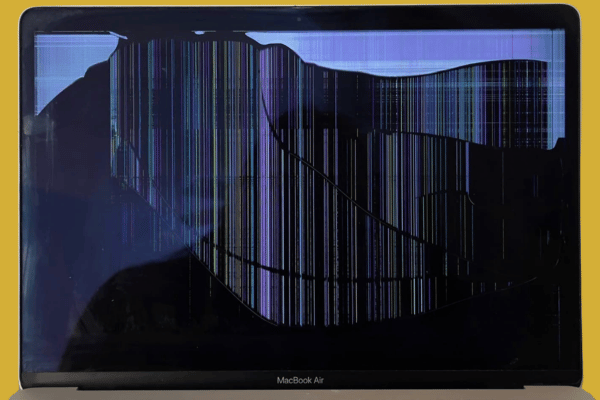
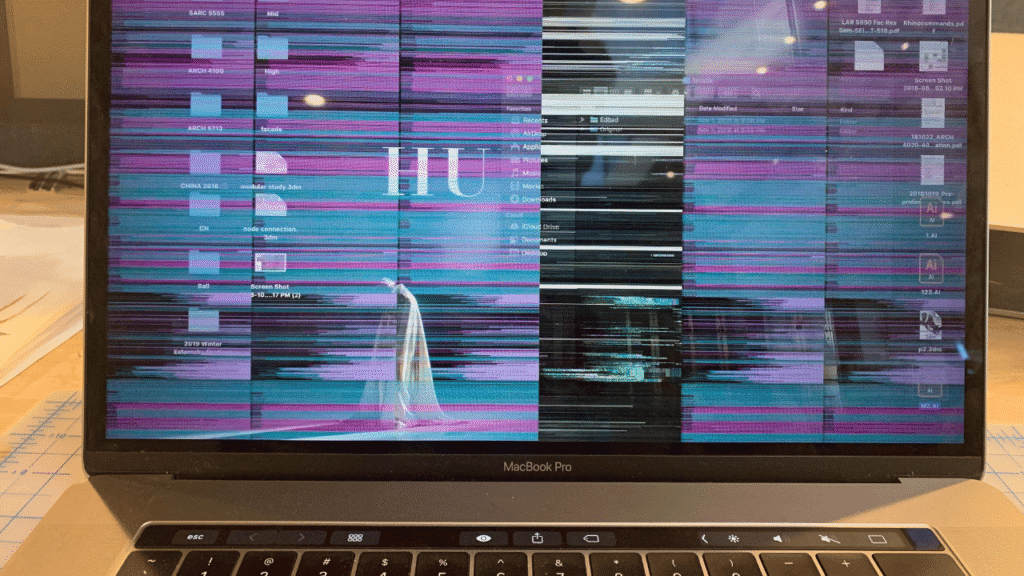
It is a stressful moment for any Mac user. You open your MacBook Air or MacBook Pro, and instead of a clean desktop, your screen starts flickering violently, showing horizontal bars, or flashing a solid pink colour. Sometimes the display works perfectly fine when you open it slightly, but goes pitch black the moment you push the lid back to a normal working angle.
This display issue is incredibly common on modern M series laptops. When this happens, it puts you in a difficult dilemma, especially for students with no active income or users on a limited budget. You start wondering if you should invest money into a repair or if it is a total loss situation where you should just buy a brand new computer.
If you take your Mac to an official authorised service centre or retail shops, their solution is always a full, expensive display exchange. But worst of all is their rigid testing policy that can completely blow your budget out of the water.
Quick Summary: Authorised service centres practice a policy where they replace your broken screen first before checking if any other internal components are faulty. This leads to hidden costs later. At OrangeFix, even if a screen issue is confirmed, our skilful technician team conducts a thorough check using a strict pre and post repair checklist to guarantee there are no surprise charges.
The Authorised Trap: “Repair This First, Check Other Things Later”
The most frustrating experience of dealing with official company service channels is how they handle multi fault diagnostics. Their company guidelines dictate a step by step pipeline that traps budget conscious consumers.
If your MacBook has a cracked display or a flickering backlight line, they will immediately charge you for a full screen replacement. They will not test your charging ports, your keyboard, your Wi-Fi card, or your motherboard health levels until that new screen is paid for and installed.
Once their technicians mount the new screen, they will run their automated software. If they discover that a liquid spill also damaged your audio port or shorted out a left speaker circuit, they will call you back with an ultimatum: pay more money to fix the newly discovered faults, or walk away with a half functional laptop.
No one likes being told after the fact that something else is broken and that they need to add more money. For students or families trying to manage their living expenses, this corporate practice is completely unfair.
Simple Settings And Tests You Can Try First
Before you make a trip down to our service centre in Subang Jaya, our skilful technician team can recommend you trying a few safe diagnostics. While a physical hardware line failure cannot be magically fixed with software, these steps help you isolate the problem and give us valuable evidence when you bring it in.
-
The External Screen Isolation Test: Plug your MacBook into a tv or external monitor using an HDMI cable or USB-C adapter. If the external display looks perfectly clean while your laptop panel is flickering, your graphics processor is completely healthy. The fault lies strictly with the screen.
-
The Apple Silicon System Controller Reset: On older Intel Macs, users used to reset the NVRAM or SMC using complex keyboard combinations. On modern M1, M2, or M3 Apple Silicon chips, those old shortcuts do not work. To perform a full system controller reset now, simply shut down your MacBook completely, close the lid, wait for 30 seconds, and turn it back on. This forces the internal power management lines to restart cleanly.
-
Boot Safely into Safe Mode: Turn off your Mac. Press and hold the power button until you see “Loading Startup Options” on the screen. Select your main hard drive, hold down the Shift key, and click “Continue in Safe Mode”. Safe Mode clears out deep system caches and disables 3rd party graphics extensions. If your screen stops flickering in Safe Mode, a bug software application might be causing the conflict.
-
Lower the Display Refresh Rate: If you are using a MacBook Pro with a ProMotion Display, your screen dynamically shifts up to 120Hz. Go to System Settings, click Displays, and drop your refresh rate down to a locked 60Hz. Sometimes, a damaged display data cable can handle a lower refresh rate stably, allowing you to backup your critical data before coming to us.

Helping You Decide: Should You Repair Or Buy A New One?
Before we proceed with the repair, we can give you a factual, honest consultation.
If our checklist reveals that your MacBook only needs a screen replacement and that the rest of the internal motherboard components are in good condition, investing in a repair makes perfect economic sense. It saves you thousands of RM compared to purchasing a new machine, which is ideal for students or home users who just need a stable computer for online classes, Netflix, or web browsing.
However, if our initial check reveals that your flickering screen also has underlying liquid corrosion on the motherboard (logic board), a degrading battery, and an unstable processor, we will tell you straight face to face. We will give you an honest cost comparison so you can decide if it is smarter to salvage your data or transition into a new machine, rather than trapping you with surprise bills halfway through the job.
Avoid The Inexperience Place Risk: The Threat To Your Board
When users try to avoid the heavy retail markup of official franchises, they often drop their premium laptops off at a cheap inexperience place. These low level stalls do not use strict testing checklists like us.
To cut corners, they source cheap, unverified 3rd party display panels that do not have proper voltage regulation chips. When their untrained staff force these screens onto an M1 or M2 MacBook without checking the power rails, it can cause an instant electrical short circuit. A low level screen can severely damage your backlight power line on the motherboard, turning a simple screen repair into a total loss disaster.
Because we operate right alongside the biggest distribution parts network in Subang Jaya, we have immediate access to premium grade display assemblies that match factory specifications perfectly.
Your machine is handled with extreme care, and every step is cross verified by our partner company MacFix Subang Jaya to ensure maximum stability.
Frequently Asked Questions:
Q: M1 MacBook screen is flickering, but it looks normal when I plug it into an external monitor. Why?
A: This is a classic symptom of a physical display failure, often related to a damaged or torn display cable inside the hinge. When you plug your laptop into an external television or monitor, the graphics processor bypasses the internal laptop screen lines completely. This proves that your main motherboard logic is fully healthy, and your laptop only requires a screen replacement.
Q: What is the Stage Light effect on a MacBook display, and can it be repaired?
A: The stage light effect happens when the bottom of your screen shows alternating dark and bright patches, resembling theatre spotlights. This is caused by a torn backlight cable due to opening and closing the lid over a long time. An inexperience place might try to patch the delicate cable using crude soldering, but the permanent and reliable solution is replacing the display assembly using verified parts.
Q: If I am a student on a strict budget, can I know if my Mac is worth repairing or buy a new Mac?
A: We evaluate this by looking at your machine using a long term usability level lens. If your core chassis, keyboard, and motherboard circuits are healthy according to DriveDX and battery stress tests, a screen replacement is highly economical. It gives your Mac for a fraction of the cost of a new MacBook, which is perfect for online classes, assignments, and daily communication.
Q: Will my MacBook lose True Tone after a screen replacement?
A: True Tone data is linked to your original screen microchip at the factory level. If a shop performs a rushed part swap, True Tone will be permanently disabled. Our skilful technician team uses specialized data transfer tools to cleanly migrate your original display calibration data over to the new panel, preserving your natural viewing quality and True Tone features perfectly.
Conclusion
A flickering screen or a sudden burst of lines across your MacBook display does not mean you have to rush out and spend thousands on a brand new Mac. However, you must protect yourself from shops that replace parts blindly before checking if the rest of your machine is even alive.
Real technical authority is built on transparent logic and strict verification. By checking your entire laptop thoroughly using our detailed pre and post repair checklist, we eliminate the risk of hidden costs and give you the honest facts you need to make the right choice for your budget.
If your MacBook display is flashing, showing lines, or going blank when opened, bring it to our independent team in Subang Jaya for a complete, honest diagnostic check and a proper repair.
OrangeFix is an independent repair centre and is not affiliated with Apple.

Topics That Might Interest You
-
MacBook Logic Board Repair Malaysia: The Middleman Secret
Discover the hidden pipeline in the Klang Valley repair industry, why many flashy shops secretly ship their complex motherboard failures to our partner company MacFix Subang Jaya, and how you can save money by going direct to the engineering source.
-
MacBook Air & Pro Storage Upgrade Malaysia
Is your Mac choking under hidden cache clutter or running out of physical disk space? Read our storage upgrade guide to see how expanding your internal drive capacity is a much cleaner, permanent fix than paying for ongoing cloud subscriptions.
-
Vintage and Obsolete MacBook Repair Guide
If your trusted older Mac is from 2012 onwards and a corporate franchise has rejected it due to its age, read this article to see how component level electronics care can give your classic hardware many more years of stable life.

About The Author
This article is written with input from Kevin, who has 18 years of hands on experience in MacBook repair, logic board inspection and Apple device care. Kevin and the OrangeFix team are also daily Apple product users, so every guide is written from real repair experience and practical user understanding.
Kevin has shared his repair knowledge through a CityPlus FM radio interview and has also been featured twice in The Star for gadget care, water damage advice and digital decluttering tips.
OrangeFix is an independent repair centre in SS15, Subang Jaya, and is not affiliated with Apple.