


Table of Contents
ToggleIs My Data Safe During a MacBook Repair?
The Absolute Privacy Blueprint
Let us address the elephant in the room right out of the gate: handing over your MacBook filled with your private photos, personal videos, work emails, and active bank logins to a stranger feels incredibly invasive. It is the single biggest psychological barrier that makes users delay fixing a broken device. You are completely justified in asking: Is my data actually safe during a MacBook repair?
The short answer is yes, your privacy can be completely protected. However, as a technician, we need to be transparent about why technicians ask for a login password, what happens behind the tech bench, and how you can lock down your private data without delaying your hardware fix.
Here is the exact engineering breakdown of how we balance strict data security with physical hardware testing.
Why Does a Technician Actually Need My Password?
Many owners assume that physical hardware replacement do not require macOS access. But in reality, a repair is completely useless if we cannot confirm that the new components are performing perfectly.
We require a user login path to access the basic operating system frameworks for specific hardware categories:
1. Change Battery
When we replace a degraded battery, we do not just change the battery in and close the casing. We have to install specialized 3rd party monitoring utilities like CoconutBattery to test the real time charging and discharging voltage numbers. We must monitor how the power rails respond when plugging in the USB-C charger and verify the exact systemic draw the moment the charger is disconnected.
2. The Screen Calibration
Testing a newly installed screen assembly requires checking the system preferences. We have to log in to verify the display colour calibration profiles, confirm the ambient light sensors trigger the sleep function correctly, and test brightness profiles. Furthermore, we run high resolution white color background tests to check pixel saturation and black color flatness loops to ensure there are zero manufacturing edge bleeds. We also have test the front camera to make sure the data ribbon connctor is installed perfectly.
3. The Logic Board and Liquid Recovery Testing
If your MacBook suddenly goes dark due to a component failure on the logic board, a drop, or severe liquid spillaged, we focus entirely on micro soldering to restore power first. Once the board is revived, we still require a user login path to run standard internal hardware diagnostic loops to ensure the system remains perfectly stable.

Strict Data Isolation
We have built our reputation on complete operational transparency. Long before the enforcement of the Personal Data Protection Act (PDPA) 2010, we already practiced exceptionally strict compliance regarding customer data security.
Here is our firm baseline commitment to your privacy: we will never open your personal media folders, photo albums, or document directories unless you have explicitly asked us to perform a manual data rescue backup or full system data migration.
Our team follows a standard operational practice when in customer workspace: if any automated apps, email clients, or messaging channels launch concurrently with the system startup, our technicians immediately close and exit the software to prevent background previews. We are here to fix hardware, not look through your life.
The Standard User Account Solution: 256 Bit Logical Isolation
If your Mac or iMac is currently functioning normally and you are planning a future service drop off, you can entirely bypass the password concern using a built in macOS security feature.
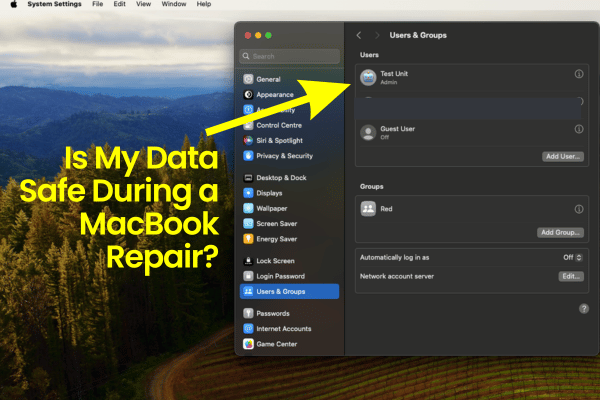
You can use our step-by-step documentation page on how to create a standard user on Mac to set up a clean, secondary profile purely for our tech team to use.
Tech Breakdown Simplified
Current Apple systems utilise advanced storage volumes backed by 256 bit encryption blocks. When you create a separate Standard User Account, the operating system sets up a strict, isolated partition barrier.
A Standard login gives us full access to the keyboard, web camera, battery diagnostic ports, and display preferences.
However, a Standard user is physically blocked from viewing, copying, deleting, or modifying anything residing inside the primary Administrator profile. Your apps, system keychains, and personal files remain entirely invisible and locked behind your private Admin password.

The Corporate Compliance & Sensitive Data Workarounds
We know that many professionals use their Mac for corporate tech firms or banking institutions that enforce strict data compliance rules, making it completely impossible to share login details. If you have highly sensitive data, do not feel shy, awkward, or uncomfortable telling us. We have built smooth alternatives to fit your security profile:
Option A: The Subang SS15 Unlock
You do not have to share your password. Simply drop off the Mac for its physical hardware rebuild or logic board micro soldering repair. The moment our technician can turn on the device, we will inform you. You can walk straight into our shop at Subang SS15, unlock the Admin profile yourself, use our quick guide to set up a Standard User Account, log entirely out of your personal workspace, and hand back the unlocked Mac to us for final testing.
Option B: The Absolute Cloud Wipe
If your entire digital files are securely backed up to your cloud platform and you do not care about the files currently sitting on the physical storage chip, you can choose the best security path. Log into your Apple Account from another active device and set a remote “Erase Device” command. The exact second your MacBook powers up and its connected to the Wi-Fi in Recovery mode, it will instantly self delete everything on the internal drive. You get a completely blank slate like a new Mac, ensuring absolute peace of mind.
Frequently Asked Questions
Can a standard repair shop bypass my Admin password if FileVault is turned on?
No. Leading independent security analyses and global technology teardowns confirm that when FileVault is enabled on Apple Silicon, your data volume is locked using high-level XTS-AES-256 cryptographic keys. Without your explicit account password or the master recovery key, it is mathematically impossible for any 3rd party technician to access or read your personal files.
What happens to my data files if you have to repair a dead logic board?
Because we specialise in component level micro soldering rather than only board replacements, we target the specific blown resistors or shorted power chips on your original logic board. This specialised engineering approach preserves your original soldered flash storage drive intact, ensuring that your operating system, application files, and databases remain completely undisturbed once power is restored.
Do you require my Apple ID or iCloud password to verify a hardware repair?
No. We will never ask you to share your Apple ID password or your iCloud security keys. Our diagnostic testing protocols run entirely on the local operating system level to verify hardware values. Your Apple Account credentials should remain completely private to you.

Topics That Might Interest You
Want total financial peace of mind before handing over your hardware? Read our baseline policy breakdown on a no fix no fee macbook repair to see how we keep your repair entirely risk free.
Struggling with a completely dead machine but desperately need your data back? Find out how our data first repair protocols save files when a macbook cannot turn on need files crisis hits your workflow.
Managing enterprise hardware or looking to safely decommission older corporate systems? Explore our professional guidelines for macbook recycling for companies in malaysia to protect your data privacy at scale.

About The Author
This article is written with input from Kevin, who has 18 years of hands on experience in MacBook repair, logic board inspection and Apple device care. Kevin and the OrangeFix team are also daily Apple product users, so every guide is written from real repair experience and practical user understanding.
Kevin has shared his repair knowledge through a CityPlus FM radio interview and has also been featured twice in The Star for gadget care, water damage advice and digital decluttering tips.
OrangeFix is an independent repair centre in SS15, Subang Jaya.