


Table of Contents
Toggle3 Free Mac Apps To Keep Your MacBook Awake And Prevent Sleep
Every real Mac user knows the annoyance of leaving their MacBook alone for a few minutes, only to come back and find the screen completely black. By default, macOS is designed to put your computer to sleep quickly to save power.
But sometimes, you need your computer to stay fully awake. Whether you are downloading a huge project file, backing up data, giving an important presentation, or trying to stay active on work messengers like Slack or Teams, automatic sleep becomes a major problem.
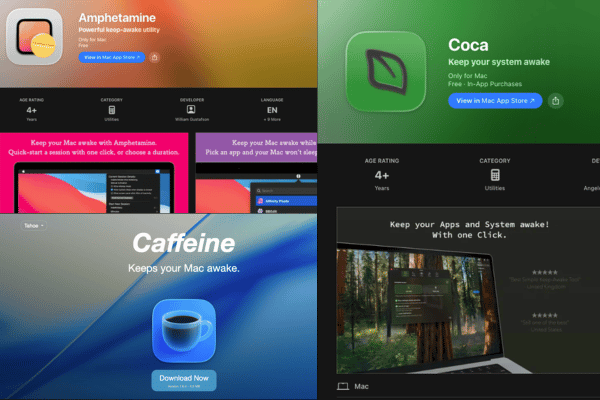
Instead of constantly tapping your trackpad to keep the screen active, you can use a small utility app to handle it. Here are 3 completely free Mac apps that keep your system awake, along with a few important warnings on how to protect your hardware from long term damage.
Quick Summary: You can use free apps like Amphetamine, Caffeine, or Coca to stop your Mac from sleeping with one click. However, leaving your MacBook awake constantly at maximum brightness generates excessive heat that can degrade your battery health level and wear out your screen panel over time.
Amphetamine: The Gold Standard For Power Users
Amphetamine is the most famous and powerful keep awake utility available on the Mac App Store. It is 100% free with no advertisements, no tracking, and no hidden features locked behind a pro level subscription.
Forum reviews on sites like Reddit praise Amphetamine because it is incredibly customizable. Instead of a simple on off switch, you can set complex triggers. For example, you can tell the app to keep your MacBook awake only while a specific file is downloading or while your office Wi Fi network is connected.
It also supports Closed Lid Mode, which allows your MacBook to continue running heavy background tasks even when you fold the screen down.
Caffeine: The Ultra Simple Classic Coffee Cup
If Amphetamine feels too complicated with too many settings, Caffeine is the perfect alternative. Originally created in 2006, it is an open source utility that has been modernized to run smoothly on newer macOS versions and Apple Silicon chips.
The beauty of Caffeine lies in its absolute simplicity. It places a tiny coffee cup icon on the right side of your top menu bar.
-
Empty Coffee Cup: Your Mac follows its normal system settings and will sleep normally.
-
Full Coffee Cup: Caffeine is active, preventing your Mac from dimming the display, sleeping, or launching the screen saver.
User reviews on community boards show that people love Caffeine because it does not use any background system memory and takes up less than 5 megabytes of storage space. It is a clean, no nonsense tool for anyone who just wants a basic one click trigger.
Coca: Lightweight Controls With Deep Activity Features
Coca is another lightweight tool that has been supporting Mac users for over 10 years. It recently launched a major version 2.0 update that refreshes the interface and adds deep control features. Coca is free to download and use from the App Store, with optional support donations if you want to help the developer.
What makes Coca unique compared to Caffeine is its focus on modern work workflows. Besides keeping your system awake, Coca includes a built in feature that moves your mouse cursor slightly when you are idle.
This minor mouse movement is invisible to you, but it tricks the computer into thinking you are physically present. This is highly popular for remote workers who want to maintain their active green status on company messaging apps while they step away from their desk for a quick coffee break. It also includes an easy checkbox to enable Closed Lid Mode without any complicated configurations.
Hardware Warnings: The Hidden Cost Of Keeping Your Mac Awake
While these apps are highly convenient, leaving your MacBook awake indefinitely can cause severe physical wear on your internal hardware.
We often see customers bringing in broken laptops simply because they left their machines running hot inside a backpack or running non stop on a desk.
Accelerated Battery Degradation
When your MacBook is kept awake continuously, the processor and internal circuits generate constant baseline heat. Heat is the ultimate enemy of lithium battery cells.
If your laptop is kept awake while plugged into a charger 24 hours a day, the internal temperature damage the battery level, causing the cells to degrade fast or even swell up physically. If you notice your laptop case lifting or your trackpad becoming hard to click, your battery is likely swelling.
Screen Brightness Quality and Backlight Wear
Leaving your screen turned on at maximum brightness for hours while you are away from your desk places massive stress on the display panel.
Modern Mac screens use high voltage backlights. Continuous operation at high brightness can cause uneven brightness wear, vertical lines, or permanent image retention on the panel. If you need your Mac system to stay awake for a background download, always make sure to use your app settings to allow the display to turn off while keeping the system processing lines alive.
Frequently Asked Questions:
Q: Are these keep awake apps safe to use on modern Apple Silicon MacBooks?
A: Yes, the apps themselves are completely safe as they use official macOS power management protocols to pause the sleep timer. The only risk comes from human error, such as leaving the Mac awake inside a tightly closed laptop bag, which traps the heat and can cook the motherboard.
Q: Can I keep my MacBook awake while the lid is closed using these free apps?
A: Yes, both Amphetamine and Coca support closed lid operation. However, you must make sure your Mac is connected to a power adapter, as macOS will naturally override the app and force sleep if the laptop is running purely on battery power with the lid closed.
Q: Is there a built in way to keep my Mac awake without downloading apps?
A: Yes, you can open the built in Terminal application on your Mac and type the command caffeinate, then press Enter. Your Mac will stay awake as long as that Terminal window remains open. However, this method does not give you easy timers, menu bar icons, or closed lid control, which is why most users prefer using a dedicated free app.
Conclusion
Using a free app to keep your Mac awake is an excellent way to handle long downloads, presentations, or background scripts without interruption. Whether you choose the deep customization of Amphetamine, the classic simplicity of Caffeine, or the remote work focus of Coca, you can easily control your system sleep with one click.
Just remember to practice proper hardware care. Turn down your screen brightness when you walk away and never leave an active, awake MacBook inside a protective sleeve. Taking care of your operating temperature protects your battery life and keeps you from needing expensive hardware fixes down the line.
OrangeFix is an independent repair centre and is not affiliated with Apple.

Topics That Might Interest You
-
MacBook Screen and Battery Replacement Direct from the Source
If you use keep awake utilities frequently and notice your battery health level dropping fast or your screen panel showing dim corners, you should read this guide. It explains how you can get premium grade replacement parts straight from the biggest distribution hub in Subang Jaya, helping you avoid the heavy retail markup charged by those shops that are everywhere.
-
MacBook Black Screen Software Diagnosis Failure
Disabling sleep mode can sometimes cause your laptop to run hot and trigger a sudden power line failure. This article explains why official service counters may give wrong advice when your display goes black, and why an inexperience place will wrongly tell you to replace the entire logic board when only a small chip is broken.
-
MacBook Air Storage Upgrade Malaysia or MacBook Pro Storage Upgrade Malaysia
Keeping your Mac awake overnight is usually necessary because you are downloading or transferring massive system data files. If your baseline hard drive is completely full and choking your performance, you can read our live upgrade solutions to see how we expand your storage capacity safely without forcing you to buy a brand new machine.

About The Author
This article is written with input from Kevin, who has 18 years of hands on experience in MacBook repair, logic board inspection and Apple device care. Kevin and the OrangeFix team are also daily Apple product users, so every guide is written from real repair experience and practical user understanding.
Kevin has shared his repair knowledge through a CityPlus FM radio interview and has also been featured twice in The Star for gadget care, water damage advice and digital decluttering tips.
OrangeFix is an independent repair centre in SS15, Subang Jaya, and is not affiliated with Apple.