


Table of Contents
ToggleMacBook Trackpad Not Clicking Malaysia
Is It Really The Trackpad?
Do not rush to ask for a trackpad replacement quotation yet. Many users assume the trackpad is spoiled, but the trackpad itself is not always the real problem.
In many cases, the fault may come from the trackpad connector cable, input output connector board, controller, battery pressure, liquid damage, or logic board signal issue.
OrangeFix checks the MacBook properly before confirming whether the trackpad really needs replacement.
What You Can Try First?
Before sending in, you can try a few safe basic checks.
- Restart the MacBook.
- Connect an external mouse and see whether the pointer works.
- Check Trackpad settings under System Settings.
Apple allows users to adjust trackpad click pressure, tracking speed, Force Click and haptic feedback settings, so a setting issue can sometimes make the trackpad feel different. (support.apple.com)
If the pointer does not move, Apple also advises checking how the trackpad is being used, because some gestures need different finger actions. (support.apple.com) Also if these simple checks do not help, the problem may be hardware related.
Why It May Not Be The Trackpad?
A trackpad click issue can happen even when the trackpad surface is still good. The connector cable may be loose, damaged or corroded.
- The input output connector board may have failed or controller may not be sending the correct signal.
- Liquid damage can affect the trackpad circuit or connector area.
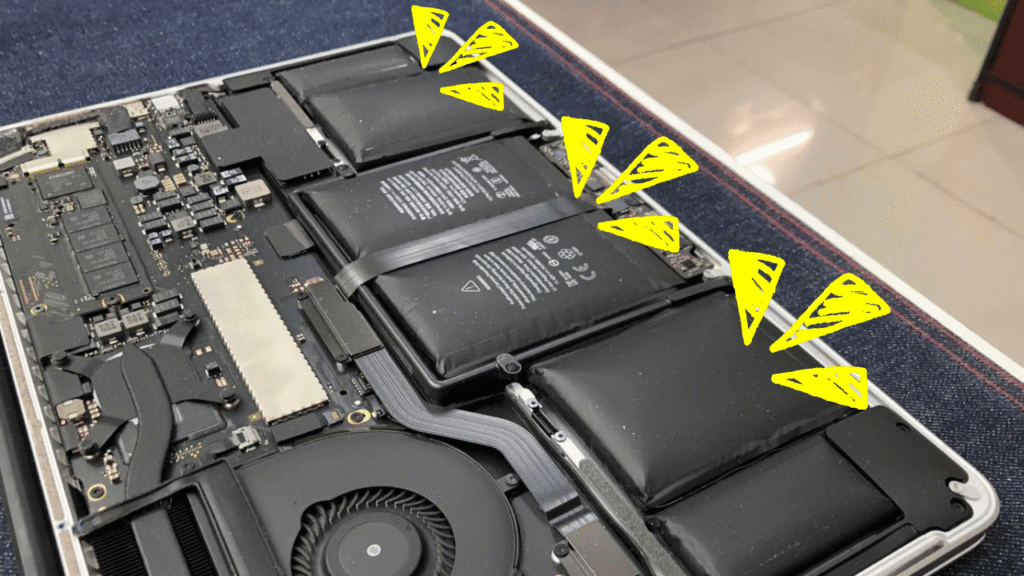
- A swollen battery can press from underneath and make the trackpad feel hard, stiff or unable to click.
That is why changing the trackpad blindly may not solve the issue.
Common Signs We Check
The trackpad may still move the pointer but:
- cannot click
- works for a while, then stops again.
- can tap to click, but physical click does not respond.
- have no pointer movement at all.
Others show keyboard and trackpad problems together after water damage.
Online user discussions also show cases where people experience trackpad click failure, haptic feedback issues, or swollen battery pressure affecting the trackpad area. (reddit.com)
Swollen Battery Can Feel Like Trackpad Failure
This is important. If the trackpad suddenly feels hard to press, uneven, lifted, or strange, the battery should be checked.
A swollen battery can push against the trackpad from inside. Some users in Apple and Reddit discussions reported trackpad click problems together with battery swelling or bottom case bulging. (discussions.apple.com)
Do not keep using the MacBook if the casing looks swollen or the trackpad area feels lifted. Battery swelling should be checked quickly.
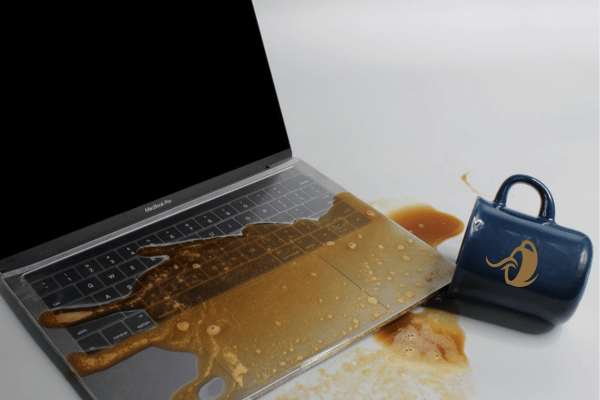
Liquid Damage Can Affect The Trackpad
If water, coffee, tea, bubble tea or any liquid touched the MacBook, the trackpad issue may not be only a trackpad issue.
Liquid can reach the trackpad cable, keyboard area, battery connector, input output board or logic board.
YP Mac has shared that water damage can affect keyboard and trackpad response, and users should shut down the MacBook quickly, disconnect the charger and get proper assessment. (ypmac.com.my) Once corrosion starts, a simple issue can become harder to repair.
Previous Repair Can Make It Worse
If the MacBook was opened or repaired before, tell us early. Trackpad cable, connector board and logic board parts are delicate.
YP Mac has written before that wrong diagnosis, improper handling, weak repair skill, wrong parts and poor testing can cause further logic board damage. (ypmac.com.my)
A simple trackpad cable issue can become more complicated if the connector is damaged during repair.
What OrangeFix Checks?
OrangeFix checks the trackpad response, click behaviour, pointer movement, connector cable, input output connector board, battery condition, signs of swelling, liquid marks and logic board signal direction.
If the trackpad itself is faulty, we will advise replacement. Sometimes the issue comes from the cable, input output board, controller or logic board, we will explain the correct repair direction.
Frequently Asked Questions:
Why Is My MacBook Trackpad Not Clicking?
It may be caused by trackpad failure, connector cable issue, input output board fault, controller issue, swollen battery, liquid damage or logic board signal problem.
Does Trackpad Not Clicking Mean I Need Trackpad Replacement?
Not always. The trackpad may be fine. The real issue can be the cable, connector board, battery pressure or logic board signal.
Can I Still Use Tap To Click?
Sometimes, yes. If tap to click works but physical click does not, the issue may be mechanical, haptic, setting related, or caused by internal pressure.
Can A Swollen Battery Affect The Trackpad?
Yes. A swollen battery can push against the trackpad and make it hard to click or stop clicking properly.
Can Water Damage Cause Trackpad Failure?
Yes. Liquid can damage the trackpad cable, connector, input output board or logic board area.
What Should I Try Before Sending In?
Restart the MacBook, check Trackpad settings, try an external mouse and see whether pointer movement still works.
Should I Keep Using It If The Trackpad Area Feels Lifted?
No. If the trackpad or bottom case feels swollen, stop using it and send it for checking.
Can OrangeFix Check Before Quoting?
Yes. OrangeFix checks first to confirm whether the issue is trackpad, cable, input output board, battery, liquid damage or logic board related.

Conclusion
Try the safe basic steps first, but do not erase or reset the Mac if your files are important.
Send it to OrangeFix for proper checking if it keeps restarting, cannot enter Recovery, cannot detect the startup disk, or still cannot load into macOS.
Orange Fix Services is an independent repair provider built on two strong foundations, YP Mac 18 years of hands on Apple repair experience, and MacFix B2B parts supply network that supports many repair shops and dealers.
For customers, this means clearer diagnosis, stronger repair knowledge, and a more direct source for parts support.