


Table of Contents
ToggleMacBook Not Charging In Subang Jaya? It Might Not Be The Battery
You are sitting at your favourite café in Subang SS15 or Sunway, trying to finish up a work project or university assignment. You plug in your Apple USB-C charger, but the battery icon does not change. There is no charging chime, and the battery % slowly drops until the screen goes completely black.
When a MacBook stops taking power, most users immediately assume the battery has died. If you take it to a standard repair shop in the Klang Valley, they will usually agree with you and quote you for a new battery right away.
But out of warranty charging issues are rarely that simple.
Quick Summary: A MacBook that refuses to charge could have a healthy battery. The actual fault is usually a failed power chip or a short circuit on the motherboard. Rushing into a quick battery swap without testing the board is a guessing game that wastes your money.

Café Reality: Why MacBooks Suddenly Stop Charging?
MacBooks are highly portable, which means they go everywhere with us. If you work out of cafés around Subang Jaya or Sunway, your laptop power port is exposed to constant wear and tear.
Dust from your laptop bag, tiny drops of condensation from iced drinks, and sudden electrical fluctuations from public power points can all damage the charging logic. Before you spend money replacing expensive parts, you need to understand where the system is actually breaking down.
Why Most Shops Rush Into a Battery Swap Too Fast?
If you visit a high volume corporate chain with multiple branches across KL and Selangor, their business model is built around speed. They want your Mac in and out as fast as possible.
Because swapping a battery is a quick, 15 minute job that requires no complex technical logic, they will usually push for a replacement immediately.
The trap happens when the root cause is actually on the motherboard (logic board). A hidden short circuit will eventually drain and damage the brand new battery too, leaving you stuck with the exact same charging issue a week later.
Real Culprit: Failed USB-C Controller Chips
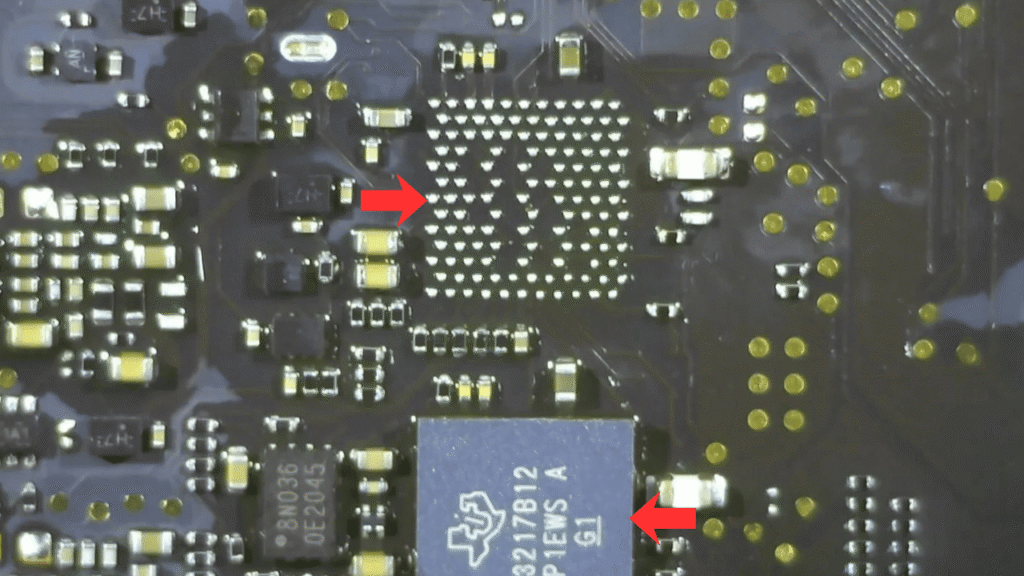
Modern MacBooks use specialised micro chips power controllers to handle power distribution. These chips act like traffic police. When you plug in your charger, these chips negotiate with the power adapter to safely pull the high voltage your Mac needs to run and charge.
These chips are highly sensitive. If you use a cheap third party power bank, a low quality car charger, or a damaged type C dongle bought online, a sudden voltage spike can instantly burn the controller chip.
The Technical Reality: When a USB-C chip burns out, your logic board gets stuck pulling a safe baseline of only 5 volts instead of the required 20 volts. Your Mac will not turn on and your battery will not charge. A new battery cannot fix a dead power controller chip.
The Danger of Cheap Repair Quotes
When you text random repair places looking for the lowest price, they will give you a very cheap quote over WhatsApp just to get you through their door.
These shops are fighting a price war to the bottom, so they do not invest in expensive diagnostic multimeters or logic board schematics. If they open up your Mac and find out it is a motherboard fault rather than a simple part swap, they will start guessing.
They might use a generic heat gun to blast the board with high heat to see if it starts working by luck. In our 18 years of technical experience, this trial and error method is the easiest way to permanently damaged your motherboard circuits and destroy your data.
How We Track Down the Hidden Power Fault Without Guessing?
At OrangeFix, we do not guess. Our brand philosophy is proper checks, proper repair. Before we recommend any part replacement, we trace the power rails using specialised tools.
We separate the symptoms logically:
-
We check the charging port: We test the type-C ports under a microscope for physical corrosion or loose solder points.
-
We disconnect the battery: We test the board using a stable tester power supply to see exactly how much current the motherboard is pulling on its own.
-
We map the power rails: We measure the main voltage lines to see if a small chip or a tiny capacitor is shorting the system to the ground.
By finding the exact root cause first, we can often repair your existing board by micro soldering a single faulty chip. This saves you from paying for an expensive whole board replacement from offcial service centre.
Frequently Asked Questions:
Q: Can a cheap 3rd party charger damage my MacBook charging circuit?
A: Yes, absolutely. Cheap, unbranded USB C chargers lack the stable safety filters found in original Apple power adapters. They frequently suffer from voltage leakage, which goes straight into your Mac and burns the sensitive power controller chips on your motherboard.
Q: How do I know if my MacBook battery is actually dead?
A: If your MacBook still turns on when the charger is plugged in, but the battery icon says Not Charging or stays at 1%, the battery health may have degraded. However, if your Mac is completely black, silent, and shows no signs of life at all, the problem is almost always a motherboard power rail failure rather than the battery itself.
Q: Do you charge a diagnostic fee if you check my Mac at Subang Jaya?
A: We charge a transparent, minimal diagnostic fee to cover the technician time required to open your Mac, look under the microscope, and run proper voltage trace tests. We provide you with the exact technical details of what is wrong before we quote you for any repair. No blind guesses, no hidden charges.
Q: How many days does it take to fix a USB-C controller chip?
A: A proper micro soldering job requires 1 to 2 working days to trace the fault, safely replace the damaged chip under the microscope, and run full battery stress tests after the fix. We do not rush this process because proper testing ensures the repair lasts long term.
Conclusion
If your MacBook is refusing to charge and you want a proper, honest diagnostic check in the KL or Selangor, bring it over to our technicians. We will find out exactly what happened to your power rails and give you a practical solution.
OrangeFix is an independent repair centre and is not affiliated with Apple.

About The Author
This article is written with input from Kevin, who has 18 years of hands on experience in MacBook repair, logic board inspection and Apple device care. Kevin and the OrangeFix team are also daily Apple product users, so every guide is written from real repair experience and practical user understanding.
Kevin has shared his repair knowledge through a CityPlus FM radio interview and has also been featured twice in The Star for gadget care, water damage advice and digital decluttering tips.
OrangeFix is an independent repair centre in SS15, Subang Jaya, and is not affiliated with Apple.