



Date: 10 October 2026
Table of Contents
ToggleMacBook Cannot On? A Real Technician Guide
You open the lid of your MacBook expecting to get straight to work or study, and… nothing. The screen stays black (blank), there is no startup chime sound, and the power button no response.
When a MacBook cannot turn on, the natural reaction is to panic, search online, or ask Ai tools for a quick repair. We noticed an increasing number of clients buying replacement parts online based on self diagnoses or internet guide, only to find out later that the part they bought wasn’t spoiled at all. What looks like a dead screen, a broken keyboard, or a spoiled battery on the surface is very often a completely different circuit issue underneath.
Before you spend money on random parts or waste days waiting for delivery, here are the 6 most common real world scenarios we test daily at our shop, how you can troubleshoot them, and what it actually takes to repair them properly.
Scenario 1: Everything Is Pitch Black (No Screen, No Keyboard Light, No Sound)
If your MacBook shows zero sign of working and feels completely dead:
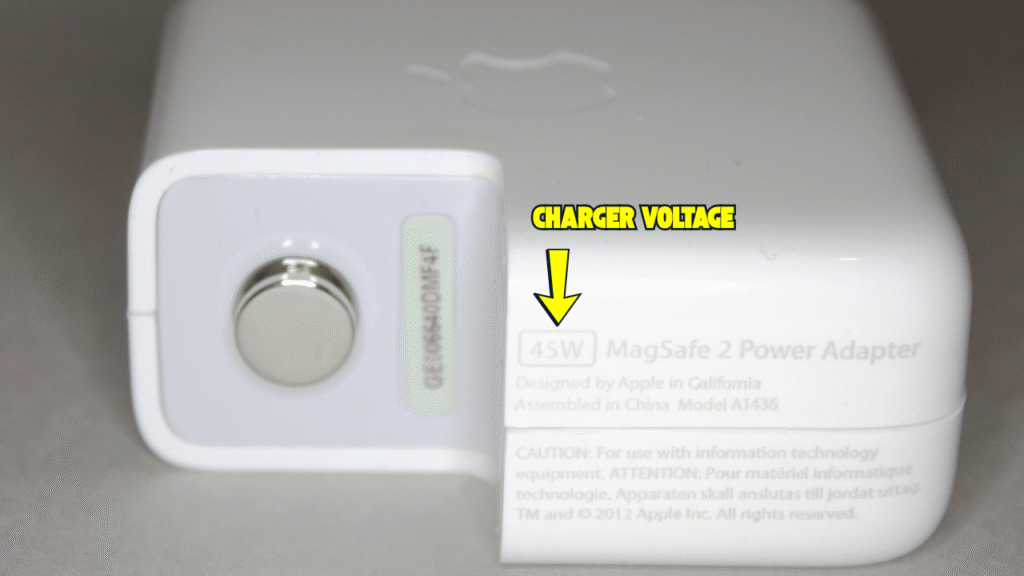
First Check Your Charger: Are you using the correct power adapter? A 13 inch MacBook Air requires at least a 30W or 35W power adapter. If your MacBook battery is drained down to 0% and you attempt to charge it using a low-wattage 18W or 20W iPhone / iPad charger, the Mac will not receive enough power to recharge the battery back up.
The Fix: Plug the MacBook into an original higher wattage Mac charger for at least 30 to 45 minutes before attempting to press the power button again.
Scenario 2: Screen Is Dark, But Keyboard Backlight Is Lighted Up
If the keyboard keys light up or the caps lock key got responds, but the screen remains dark (blank), your logic board has actually started up successfully—the issue could be display (screen) related.
How to Test at Home: Connect your MacBook to an external TV or monitor using an HDMI or USB-C cable. If your desktop appears on the external screen, your internal display (screen) or backlight circuit of the screen has failed.
The Fix: Bring it into our shop in Subang SS15 for a quick on the spot checking. We have ready stock for MacBook Air and MacBook Pro screen parts, allowing us to replace broken displays in just a few hours so your work or studies face minimal disruption.

Scenario 3: MacBook Is Extremely Laggy (Slow) or Unresponsive
When a MacBook becomes very slow out of nowhere—where even moving the mouse cursor lags—many users assume the processor or storage drive is dying.
The Battery Connection: A badly degraded or failed battery cannot supply sufficient voltage to all internal logic board components simultaneously. To prevent a sudden hardware crash, macOS automatically throttles (slow down) the CPU speed down to its lowest power state, causing massive system (OS) lag.
How to Check: Go to System Settings – Battery, or download a trusted utility like CoconutBattery. If the battery status shows “Service Recommended” or has extremely low capacity, replacing the battery will restore full speed immediately.
If the Battery Is Healthy: Back up your personal files right away, then erase and reinstall macOS. If the lag still the same after a full software reset, a storage chipset or logic board sensor has failed. If you still have official warranty, can go to claim with the official centres. But if your warranty has expired, bring it to an on the spot repair shop like ours for a fast check.
Scenario 4: MacBook Shuts Off Suddenly Halfway When Using
If your MacBook without warning turn off while you are typing or watching a video:
Weak Battery Cut Off: A weak battery can display 30% or 40% charge left, but under sudden power spikes, its internal voltage broke and cuts power to the logic board instantly. Try plugging in the charger immediately to see if it boots back up.
Liquid (Water) or Drop Damage: If the MacBook was previously dropped or suffered a liquid spill weeks ago, silent corrosion, algae build up, or broken solder joints under chipsets will cause the machine to behave weirdly and shut down intermediately when the internal components warm up.
Scenario 5: Keyboard or Trackpad (or both) Completely Cannot Use
This is one of the most misunderstood hardware issues on current Apple MacBooks.
The Internal Cable Loop: On modern M series MacBooks, the connector cable connections run in a loop: Logic Board -> Trackpad -> Keyboard.
Why Self Diagnosing Fails: Because signals pass through the trackpad first before reaching the keyboard, a faulty trackpad or a damaged flex cable will cause both the trackpad and the keyboard to go completely dead. Buying a new keyboard online will not fix the issue if the real cause are inside the trackpad controller chip or cable line. Thorough testing is required to identified the exact failing part.
Scenario 6: “How Much to Repair (Change) This Specific Chip?” (Why Blind Quotes Are Risky)
We often received messages asking: “My friend / other shop / Ai told me my power chip is broken. How much do you charge to replace that chip?”
Giving a blind quote without seeing the physical machine is irresponsible because a logic board is not just a single flat circuit:
What Actually Involves a Repair: Beside a single chipset, a logic board contains many internal copper layers, dedicated power lines, signal communication lines, and hundreds of micro capacitors. Furthermore, if a logic board was previously checked or tried to be repaired by other shop that has been outsourced yet to another party, heat gun damage or missing components from inexperienced soldering will change the repair price and process.
Avoid “Replace Only”: Official centres and non specialist shops do not repair circuits—they only change the whole board. This results in weeks of waiting times, expensive quotes, and confirm data loss.
Choose a Direct Specialist: Look for an experienced repair shop like Orange Fix in Subang SS15 where you speak directly with the technicians doing the actual hardware work.
Frequently Asked Question
Why a new battery cannot start my MacBook also?
If the main power management chipset or a controller capacitor on your logic board has short circuited to ground, plugging in a brand new battery will still produce no response. Physical testing with a power meter at our shop can test properly whether the issue is battery related or board-related before you repair anything.
Why does Orange Fix require checking my MacBook before giving a final repair price?
A logic board contains multi layered circuit traces, power rails, and signal lines. Issues like past liquid (water) contact, shorted capacitors, or improper soldering (bad repair) from previous repair attempts affect the overall board condition. Inspecting the device in person ensures an accurate, honest price quote without hidden surprises.

Topics That Might Interest You
Told that your non power Mac needs a complete logic board change? Learn how component level repair soldering saves your motherboard, keeps your data 100% intact, and cuts costs in macbook logic board repair vs replacement guide.
Facing a cracked display screen, dark backlight, or vertical lines across your screen? Check on the spot screen replacement costs and same day turnaround speeds at our shop in macbook screen replacement cost and speed guide.

About The Author
This article is written with input from Kevin, who has 18 years of hands on experience in MacBook repair, logic board inspection and Apple device care. Kevin and the OrangeFix team are also daily Apple product users, so every guide is written from real repair experience and practical user understanding.
Featured Twice in The Star newspaper Tech section
We have ben sharing practical hardware maintenance advice with the Malaysian public:
Pet Accidents & Hardware Safety: Tips on protecting MacBooks from liquid spills, pet fur, and internal fan clogs in The Star: Not ‘fur’ fun – How to protect your gadgets from pet mayhem.
Hardware Longevity & Maintenance: Insights on digital decluttering, storage care, and internal thermal servicing in The Star: Step into the Lunar New Year with a clean slate.
YouTube Radio Interview
The team also have also shared our repair knowledge through a CityPlus FM radio interview on YouTube which you can watch bellow.
OrangeFix is an independent repair centre in SS15, Subang Jaya.