


Table of Contents
ToggleBought A Used MacBook But Apple ID Locked?
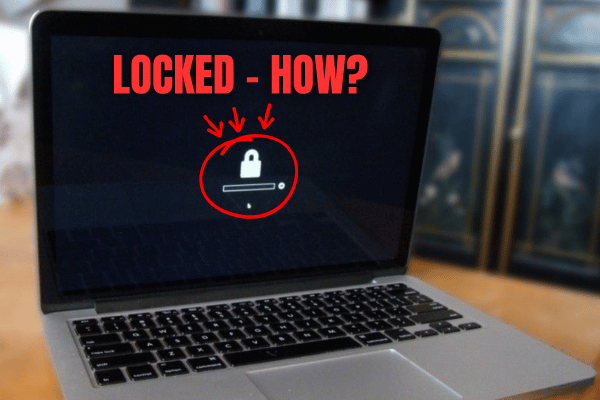
Reached home, turned it on, then suddenly it asks for someone else Apple ID?
That is not a small problem. It is Activation Lock.
For buyers, this is one of the scariest things when buying a pre loved MacBook. The MacBook may look clean, the body may look nice, and the seller may even say it was freshly formatted.
But if the previous owner did not remove Find My and sign out properly, the MacBook can still be locked to that person Apple Account.
At that point, the MacBook may become a very expensive aluminium decoration.
What Is Apple ID Activation Lock?
Activation Lock is part of Find My. It is designed to stop other people from using an Apple device if it is lost or stolen.
On Mac, Activation Lock works on Mac models with Apple silicon and Mac models with Apple T2 Security Chip. This includes many MacBook Air and MacBook Pro models from 2018 onwards.
When Activation Lock is enabled, the MacBook is still linked to the previous owner Apple Account. So even if you bought the MacBook and paid full amount, the system may still ask for the previous owner Apple ID and password. Very dangerous if you only discover this after payment.
Why Formatting The MacBook Does Not Remove Apple ID Lock?
Many buyers think a formatted MacBook means everything is cleared. Not always. MacBook can be erased (format) and still have Activation Lock because the lock is connected to Find My and the previous owner Apple Account.
That is why a used MacBook can look freshly formatted but still not be safe to buy.
The outside looks clean, setup screen looks clean. But the ownership lock may still be there waiting to appear.

Can Technician Repair Apple ID Locked MacBook?
No, this is not a normal repair issue. A technician cannot properly remove another person Apple ID lock. Formatting cannot permanently solve it.
Changing some parts is not the correct solution. Any so called bypass (hack) is not a proper long term fix for a normal used MacBook.
The correct solution is for the rightful owner to remove the MacBook from their Apple Account and turn off Find My. If the seller cannot do that, do not proceed.
How To Check Activation Lock Before Buying A Used MacBook?
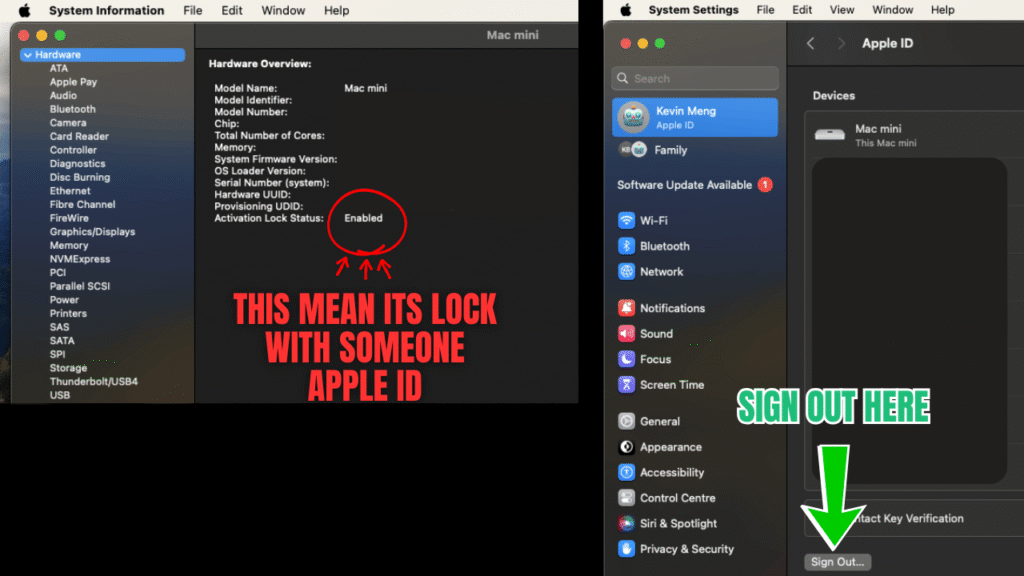
Before paying for any used MacBook, check Activation Lock Status first.
Go to System Settings -> General -> About -> System Report -> Activation Lock Status
If it shows Disabled, that is one good sign but if it shows Enabled, stop first.
Ask the seller to remove the MacBook from their Apple Account immediately. Do not accept, later I settle for you as later can become never.
Why You Should Cancel The Deal If Activation Lock Is Enabled?
If Activation Lock is enabled, the MacBook may still be controlled by the previous owner through Find My. That means the real owner may still be able to lock the MacBook later.
Imagine this: You spend RM4000.00 to RM5000.00 on a high end MacBook Pro for video editing, programming, design work or business use.
Everything looks okay for a while. Then one day, the MacBook gets locked. You message the seller:
- No reply.
- Seller missing.
Now your work, your money and your peace of mind all gone together. That is why Activation Lock is not something to play play.
Buy From A Reputable Seller With A Physical Shop
When buying a used MacBook, it is safer to buy from a reputable seller with a physical shop. If something goes wrong, you still have somewhere to go back to.
- Ask for support.
- Request refund or exchange.
- Get proper clarification.
Private seller deals may look more attractive because the price can be lower. But once payment is made and the seller goes missing, the problem becomes yours.
For an expensive MacBook, seller responsibility matters.
What OrangeFix Can Help With?
OrangeFix can help inspect a used MacBook before or after purchase. We can check the screen, battery, keyboard, trackpad, charging, ports, storage, basic performance and other visible warning signs.
But if the MacBook is locked to another person Apple ID, OrangeFix cannot remove it as a normal repair service. That part must be handled by the rightful owner.
Our advice is simple. If Activation Lock is enabled and the seller cannot remove it, walk away. Missing one deal is better than losing a few thousand ringgit.
Frequently Asked Questions:
What should I do if the seller says they forgot the Apple ID password?
Ask the seller to recover the account and remove the MacBook from Find My before you pay. If they cannot do it, cancel the deal.
Can Apple remove Activation Lock for a second hand MacBook?
Apple may require valid proof of purchase before helping with Activation Lock. If you bought from a random seller without proper proof, it may be difficult to solve.
Should I buy used MacBook from a shop or private seller?
A reputable shop with a physical location is usually safer because you have someone to go back to if there is a problem. Private seller deals may be cheaper, but the risk is higher.
Can OrangeFix check a used MacBook before I buy it?
Yes, OrangeFix can help inspect selected used MacBook models. We can check hardware condition and highlight possible warning signs before you spend your money.

About The Author
This article is written with input from Kevin, who has 18 years of hands on experience in MacBook repair, logic board inspection and Apple device care. Kevin and the OrangeFix team are also daily Apple product users, so every guide is written from real repair experience and practical user understanding.
Kevin has shared his repair knowledge through a CityPlus FM radio interview and has also been featured twice in The Star for gadget care, water damage advice and digital decluttering tips.
OrangeFix is an independent repair centre in SS15, Subang Jaya, and is not affiliated with Apple.