


Date: 19 November 2026
Table of Contents
ToggleCFO Guide to Extending MacBook Fleet Lifespans Beyond the Standard 3 Year Cycle
For years, corporate IT departments and finance teams across Kuala Lumpur and Petaling Jaya have operated on this rule of thumb: depreciate and replace company MacBook every 3 years.
This 3 year cycle didn’t happen by accident. Every new MacBook comes with a 1 year standard warranty, and adding AppleCare+ extends coverage to a total of 3 years. Once Year 3 passes, official service channels treat any hardware issue as an expensive out of-warranty thing — quoting RM3,000 to RM4,500+ for full screen swaps. Faced with those numbers, most companies simply write off the MacBook and approve budget for a brand new machine.
However, with modern Apple Silicon hardware (M1, M2, M3….. M6) delivering massive processing power, retiring a company MacBook at 36 months is no longer a technical necessity — it is an unnecessary waste of company cash flow.
Here is how forward thinking CFO and finance decision makers in Malaysia are extending their MacBook fleet lifespans to 5 or 6++ years, freeing up hundreds of thousands of Ringgit in capital expenditure without slowing down employee productivity.
The True Financial Cost of the 3 Year Replacement Trap
Consider a growing Malaysian AI tech lab, creative agency, tech startup, or consulting firm with a team of 30 staff using MacBook Airs and MacBook Pro:
| Strategy (30 MacBooks) | 3 Year Replacement Cycle | 6 Year Extended Lifecycle (With Proper Care) |
| Hardware CapEx (Over 6 Years) | RM360,000 (2 full round purchases) | RM180,000 (1 time purchase) |
| Mid Life Maintenance & Repairs | Minimal (Covered by AppleCare+) | RM22,000 (Battery, thermal servicing & logic board repairs) |
| IT Downtime & Onboarding Hours | High (Migrating 30 machines twice) | Low (Same day part swaps, zero data migration) |
| Net 6-Year Cash Outflow | Estimate RM360,000 | RM202,000 (Save RM158,000+) |
When you replace an entire Mac line prematurely, you are not just paying for new hardware—you are absorbing hidden productivity losses while your IT team spends weeks changing devices, migrating software licenses, and re-configuring employee workflows.
Why Corporate MacBooks Actually Fail at Year 3 or 4
In our daily work servicing corporate companies across KL and Selangor, we rarely see a 3 or 4 year old MacBook fail because the processor is “too slow.” Instead, premature retirements are almost always triggered by three predictable, easily fixable issues:
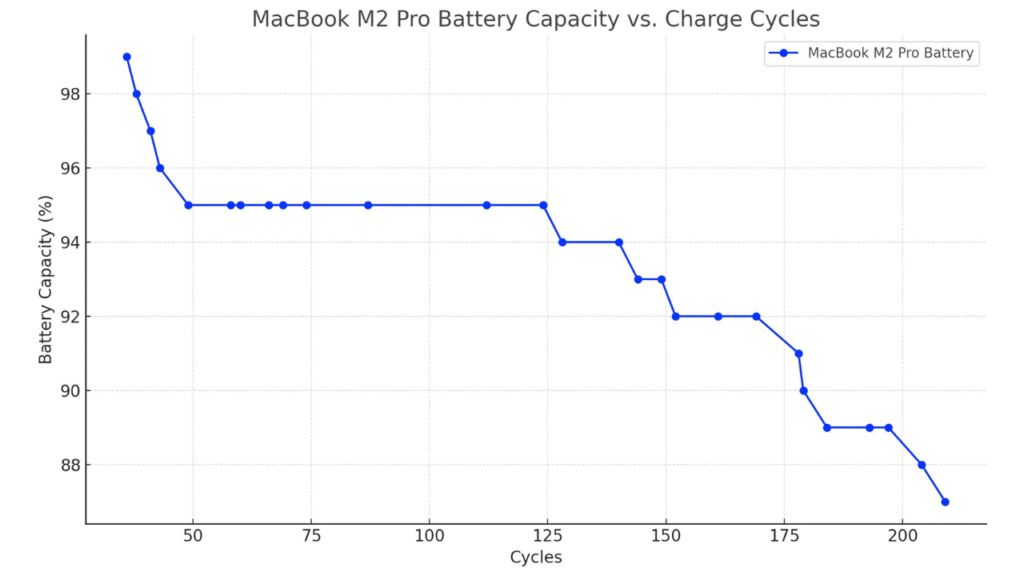
Battery Degradation & CPU Throttling: After 800 to 1000 battery charge cycles, lithium ion battery lose capacity or begin to swell. When a weak battery can no longer supply peak voltage, macOS automatically throttles (slow down) CPU speed — making an otherwise fast M-series MacBook feel sluggish (laggy). A simple battery replacement restores 100% factory speed immediately.
Dust Accumulation & Dried Thermal Paste: In Malaysian office environments, fans or aircons pull in fine dust and carpet lint daily. Over 36 months, clogged heat sinks trap heat, causing thermal throttling and premature stress on power management chips (logic board).
Accidental Spills & Out-of-Warranty Board Shorts: When an employee spills coffee on a 4 year old MacBook, official service counters quote near replacement prices for a full logic board swap. Component level micro soldering fixes the exact shorted capacitor or power IC for a fraction of that cost.
3 Practical Steps to Extend Fleet Lifespans to 6 ++ Years
To turn your MacBook line from a recurring 3 year expense into a durable 6 year asset, finance and operations leaders should implement three straightforward policies:
1. Schedule a Year 3 Mid Life Fleet Refresh: Instead of ordering new Mac when AppleCare+ expires, schedule preventative maintenance for your Macs. Replacing low capacity battery and clearing internal dust extends peak performance for another 2 to 3 years at less than 10% of the cost of new hardware.
2. Partner With a Component Level Repair Specialist (Not a “Replace-Only” Shop): Avoid shops that only change whole motherboards (logic board) and erase company hard drives. By using an independent micro-soldering specialist like Orange Fix in Subang SS15, damaged logic boards are repaired at the chip level—saving up to 70% while keeping sensitive company data intact on the original drive.
3. Monetize Retired M1+ Hardware Through Corporate Buybacks: When devices eventually reach the end of their 6 year cycle (or suffer severe physical damage), don’t let them sit in an IT storeroom depreciating to RM0. Use our corporate buyback programme for M1 series MacBooks and iMacs (and above) to recover instant cash value toward your next hardware cycle.

Frequently Asked Question
How long can a modern Apple Silicon MacBook realistically last in a corporate environment?
With basic preventative care — such as internal dust cleaning and a mid life battery replacement around Year 3 or 4—an M1, M2, M3…. M6 MacBook Air or MacBook Pro easily delivers smooth, reliable performance for 5 to 7 years of daily office, coding, or design work.
Will repairing our company MacBooks at Orange Fix compromise confidential corporate data?
No. Unlike official service counters that require format storage or swapping entire logic boards, we repair the existing motherboard (logic board) at the micro component level. Your company encrypted storage stays untouched on the original board, eliminating data loss and downtime.
Does Orange Fix offer quick turnaround times for urgent business MacBooks?
Yes. Because we maintain direct local ready stock for MacBook Air and MacBook Pro screens, battery, and charging ports at our Subang SS15 shop, most standard corporate hardware replacements are completed on the same day within a few hours.

Topics That Might Interest You
Looking to retire older company M1 series MacBook or iMac safely while recovering instant cash value for your IT budget? Learn how our corporate IT asset disposition works in macbook recycling for companies in malaysia.
Want a transparent breakdown of official service counter pricing versus independent component repair? Compare costs, turnaround speeds, and data policies in official service centre vs orange fix macbook repair guide.

About The Author
This article is written with input from Kevin, who has 18 years of hands on experience in MacBook repair, logic board inspection and Apple device care. Kevin and the OrangeFix team are also daily Apple product users, so every guide is written from real repair experience and practical user understanding.
Featured Twice in The Star newspaper Tech section
We have ben sharing practical hardware maintenance advice with the Malaysian public:
Pet Accidents & Hardware Safety: Tips on protecting MacBooks from liquid spills, pet fur, and internal fan clogs in The Star: Not ‘fur’ fun – How to protect your gadgets from pet mayhem.
Hardware Longevity & Maintenance: Insights on digital decluttering, storage care, and internal thermal servicing in The Star: Step into the Lunar New Year with a clean slate.
YouTube Radio Interview
The team also have also shared our repair knowledge through a CityPlus FM radio interview on YouTube which you can watch bellow.
OrangeFix is an independent repair centre in SS15, Subang Jaya.