


Date: 8 August 2026
Table of Contents
ToggleNot Sure You Have Apple Care? How to Check guide
A client recently messaged our team with a very common problem:
“Hi! I just cracked my iPhone Pro screen. I think I might still have AppleCare coverage, how much will Apple charge to fix it, and should I bring it to you or Apple?”
Here is our completely honest advice: If your device is currently covered by active AppleCare+ policy, you should go straight to an official Apple Service Centre.
Why would an independent repair specialist tell you not to come to us? Because we always put what is best for the device owner first.
Understanding how AppleCare+ handles accidental screen damage, why 3rd party repairs void active coverage, and how to locate your serial number will help you make the smartest financial decision.
Why You SHOULD Use Official Apple Service IF You Have Active AppleCare+
AppleCare+ is an extended warranty and insurance product that includes coverage for accidental damage (such as dropped phones and cracked glass).
If your device has active AppleCare+:
Significantly Lower Repair Fees: Apple charges a small, fixed repair fee for screen only repairs under AppleCare+ (a lot cheaper than out of warranty official rates).
Protects Remaining Coverage: Servicing your screen at an official centre ensures your remaining AppleCare+ policy duration stays valid for future incidents.
Important Warning: If you take an active AppleCare+ device to any outside shop, Apple systems will flag non official service and permanently void your remaining AppleCare+ policy.
Step by Step: How to Check If Your Device Has Active AppleCare+
Before deciding where to take your machine, check whether your policy is active:
Method 1: Directly On Your Device (Fastest)
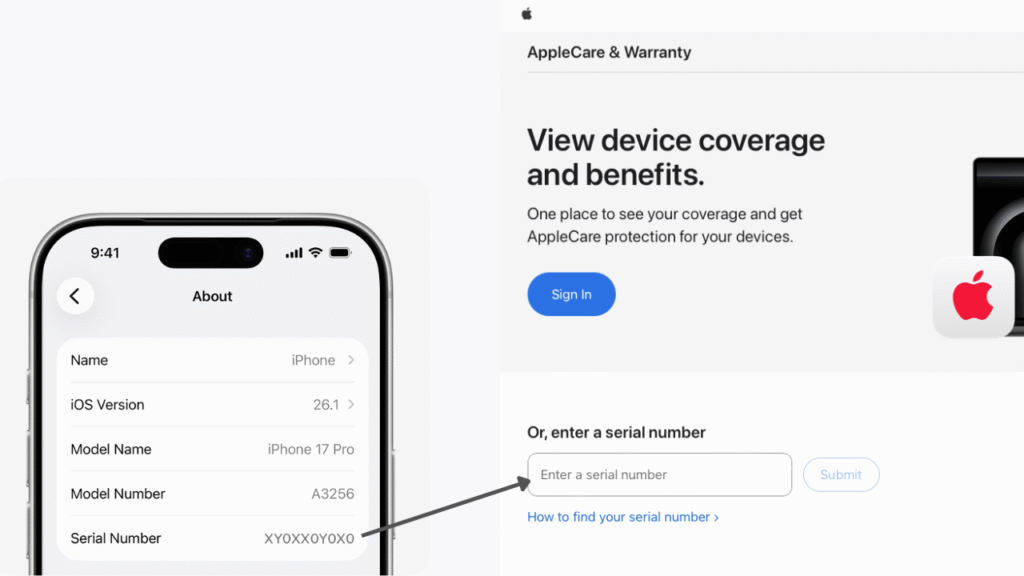
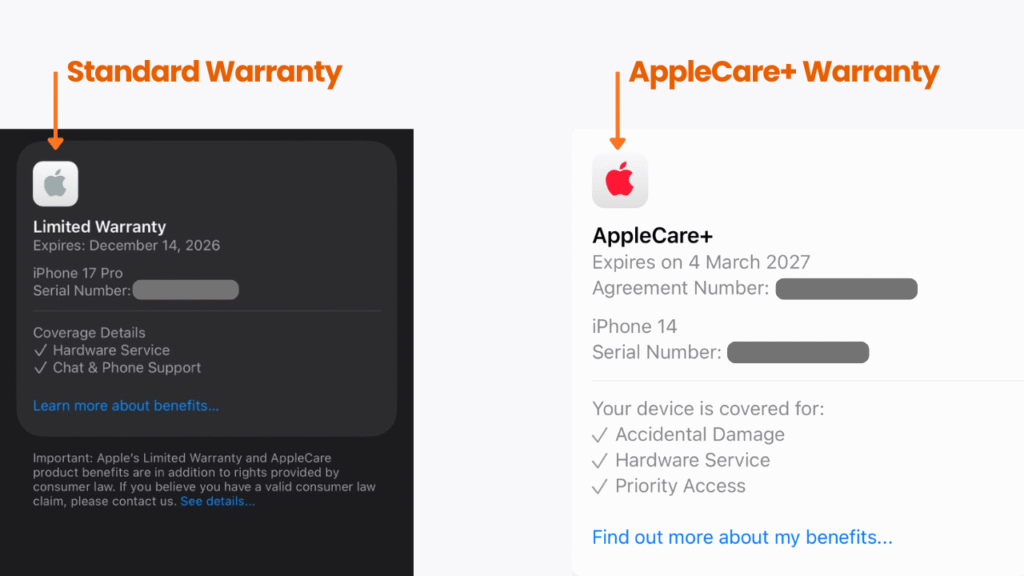
On iPhone or iPad: Open Settings ➔ General ➔ About ➔ Tap on Coverage. You will see whether your device has active AppleCare+ or standard Limited Warranty.
On MacBook or iMac: Click the Apple Logo () in the top-left corner ➔ System Settings ➔ General ➔ About ➔ Look under the Coverage section.
Method 2: Via Apple Official Coverage Portal
Open your web browser and go to checkcoverage.apple.com.
Enter your device Serial Number.
How to Find Your Device Serial Number (iPhone, iPad & MacBook)
If your screen is completely smashed or black and you cannot go to the Settings menu, here is how to locate your physical serial number:
MacBook Pro or MacBook Air
On the Bottom Casing: Flip your MacBook over. Look at the small, laser-engraved text near the top hinge on the aluminum bottom cover. You will see
Serial: XXXXXXXXXXXX.Via macOS: If the screen still works, click Apple Logo () ➔ About This Mac.
iPhone
On the SIM Card Tray: On most modern iPhone models, eject the SIM tray using a SIM pin. Look closely inside the SIM slot edge under bright light. the serial number or IMEI is engraved right inside the slot.
Via Settings: Go to Settings ➔ General ➔ About.
iPad
On the Back Metal Casing: Turn your iPad over. The serial number is printed in tiny text near the bottom center of the rear aluminum housing under the “iPad” logo.
Alternative Ways (If Device Is Completely Off)
Original Retail Box: Check the barcode sticker on the back of your original product packaging.
Original Purchase Receipt / Invoice: Printed on official physical or digital receipts.
Your Apple ID Account: Log into appleid.apple.com on any browser, click Devices, and select your registered product to view its serial number.
What If You DON’T Have AppleCare+?
If your check shows that your device only had standard 1 year Limited Warranty (which does not cover accidental screen cracks) or that your AppleCare+ has expired, official out of warranty screen quotes can be very high.
Official channels will demand full out of warranty prices, require you to leave your machine behind for 7 to 14 days, and may perform mandatory data format.
This is where turning to an independent specialist becomes a better option.
Why Independent Repair Is the Smarter Choice for Your Mac
You don’t have to accept high replacement quotes or long delays. Choosing an independent hardware specialist gives you a faster, safer, and far more budget friendly path for your Mac:
Better (Data Preservation & Precision): We repair individual micro components rather than changing your whole logic board. Your original motherboard is saved, keeping your personal files, photos, and documents 100% intact.
Faster (Zero Waiting & Ready Stock): Skip 7 to 14 day backorder delays. Direct local hardware inventory allows screen, battery, and port replacements to be completed on the spot in just hours.
More Budget Friendly: Why pay thousands for a whole motherboard when only a single chip failed? Fixing the exact fault eliminates unreasonable markups and saves you money.
Direct & Honest Care: No middleman markups, no hidden policies, and no pressure to buy a new machine, just direct technical expertise focused on extending your Mac lifespan.
Frequently Asked Questions
Does Apple standard 1 year Limited Warranty cover a cracked screen?
No. Apple standard 1 year warranty strictly covers factory manufacturing defects (such as a faulty battery cell or logic board failure). Physical damage, including glass cracks, liquid exposure, or casing dents, is classified as accidental damage and is only covered at reduced rates if you have AppleCare+
Can I purchase AppleCare+ after I accidentally crack my screen?
No. AppleCare+ must be purchased alongside your new device or within 60 days of purchase (which requires a remote or in person hardware diagnostic check). You cannot buy AppleCare+ after damage has already occurred.
What happens if I repair my screen at an independent shop while I still have active AppleCare+?
If an independent shop replaces your screen or opens your device, Apple official system will detect 3rd party hardware modifications during future visits. This will immediately void any remaining AppleCare+ coverage you have left on the device.

Topics That Might Interest You
- Denied an official warranty claim on your screen due to minor dents or liquid traces? Learn why official centers reject claims in macbook screen warranty denied malaysia.
- Confused about what AppleCare actually covers versus real world repair costs? Get the full breakdown in applecare macbook warranty coverage malaysia truth.

About The Author
This article is written with input from Kevin, who has 18 years of hands on experience in MacBook repair, logic board inspection and Apple device care. Kevin and the OrangeFix team are also daily Apple product users, so every guide is written from real repair experience and practical user understanding.
Kevin has shared his repair knowledge through a CityPlus FM radio interview and has also been featured twice in The Star for gadget care, water damage advice and digital decluttering tips.
OrangeFix is an independent repair centre in SS15, Subang Jaya.