


Date: 20 July 2026
Table of Contents
ToggleWhy Getting Your MacBook Battery Changed at Orange Fix is a Completely Different Experience
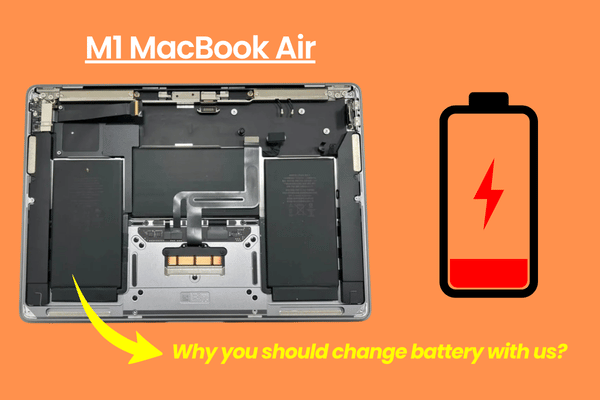
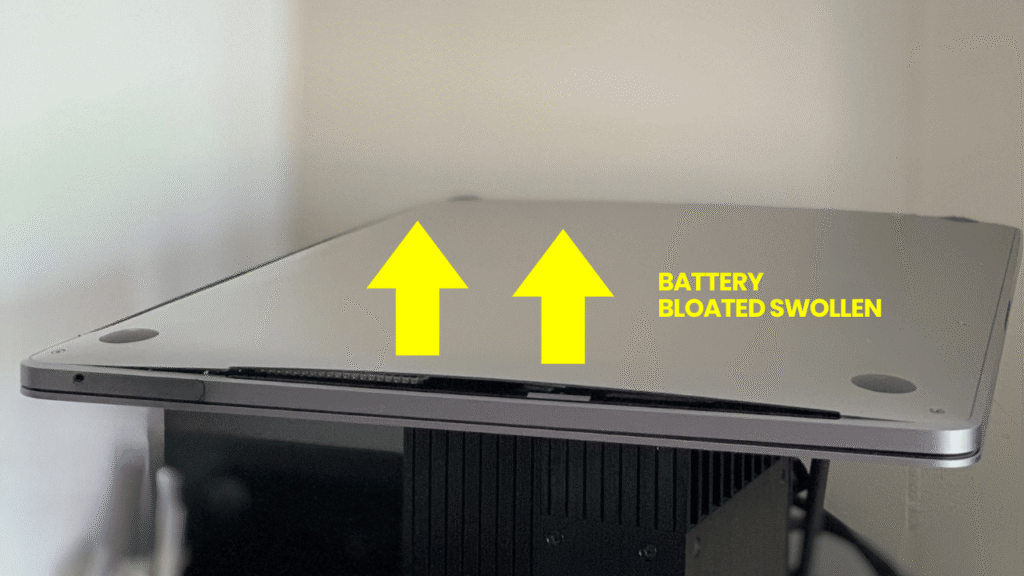
If your MacBook battery shut down the second you unplug the charger, shuts down randomly at 70%, or is swelling and pushing your trackpad upward, you know it is time. But if you search online, you will see a big price gap, from RM90.00 battery listings on e-commerce platforms to RM1000.00+ quotes at official service centres.
It leaves normal consumers completely confused. Why are online batteries so cheap? Why do official centres take weeks? And how do you know you aren’t paying for a low quality component that will expand and fail in 1-2 months?
At Orange Fix Services, we handle battery replacements with total transparency, and real technical accountability. Here is exactly why thousands of users across KL and Selangor plus many shops taking battery from us at our Subang SS15 shio when their MacBook battery give up.
Ready Battery Stock for Models from 2009 to Present (On The Spot Change)
Most repair places do not hold physical battery stock. When you drop off your laptop, they put you on hold for 2 to 3 days while they order a part from an external supplier. Official service channels can take anywhere from 7 to 14 working days just to process the request.
We operate differently. Because we act as a the main hardware supplier for dealers across Malaysia, our warehouse keeps ready stock for almost every MacBook Air and MacBook Pro model manufactured from 2009 up to the latest M series machines.
Whether you are still using an older 2012 MacBook pro or a modern M1/M2 MacBook Air, you can walk straight into our Subang SS15 shop and get your battery replaced on the spot within a few hours. No waiting lists, no leaving your Mac for weeks.
The Truth About “Cheap Online Batteries” vs. Our Grade A & Original Equivalent Options
We get asked this question every single day: “Why is your battery price higher than online?
Here is what nobody tells you: those cheap online battery are almost confirm made from recycled or reconditioned battery cells.
Some take old, degraded lithium ion cells from discarded batteries, wrap them in fresh black plastic casing, reset the cycle count chip to show “0 Cycles,” and dump them online below true product costs. They look brand new on the outside, but their internal cells is already well used. They would should big voltage drops, fail after a month or two, and carry a high risk of expanding and cracking your trackpad.
We offer two transparent, new battery tiers based on your needs:
Grade A Battery Option: Brand new, stable cells designed for budget conscious users. Gives you a solid, reliable 3 to 4 hours of normal daily usage without sudden voltage cut off.
Original Equivalent Capacity Option: Premium, high quality cells manufactured to match the exact milliampere hour (mAh) and Watt hour (Wh) capacity of the original factory unit. This gives you maximum usage runtime, identical to when your Mac was new out of the box years ago.
1 Year Warranty Protection: While official service centres generally offer only a limited 3 month warranty on replacement parts, we provide our Original Equivalent batteries with 1 year one to one exchange warranty. If the cell fails or drops capacity unexpectedly within a year, we change a new one for you on the spot.
The macOS Update Battery Effect (Why Old Macs Drain Faster)
Even if you install an Original Equivalent capacity battery, you might wonder why an older Intel Mac gives you 5 hours of runtime instead of the 8 hours it gave you back in 2017.
Here is the reality: every year macOS update adds heavier background processes, security protocols, and system features. Running a modern operating system on older CPU architecture requires more power. As software demands increase, an older processor works harder to execute the same tasks, consuming roughly 30% to 40% more energy than it did on its original factory OS version.
Pre-Replacement Voltage Diagnostics (No Wasted Money)
Nobody wants to pay for a new battery only to take the Mac home and find the machine still won’t charge properly because the charging port or logic board powerpower line was the real culprit.
Before our technicians open a single screw, we will check your Mac. We measure the charging and discharging voltage stability, test the power management integrated circuit (PMIC), and confirm that the battery is the only point of failure. If your battery is actually fine and the issue is just a shorted charging chip or a damaged USB-C connectors, we tell you immediately so you don’t spend a single sen on a part you don’t need.
Honest Consultation For Your Situation
We don’t force everyone to take the most expensive option. When you sit down at our counter, we ask you simple, practical questions about how you use your machine:
Are you planning to buy a brand new M-series MacBook in a few months and just need this old machine working as a temporary backup?
Is this Mac being passed down to an elder or a young student for basic Web browsing and YouTube?
Are you trying to stretch this machine lifespan for another 2 full years of heavy daily work?
Based on your answers, we recommend the exact battery type and price that makes financial sense for you. If your MacBook is too old to justify a big investment, we will tell you straight, no hard selling, no pushing unnecessary upgrades.
Free Dust Cleaning
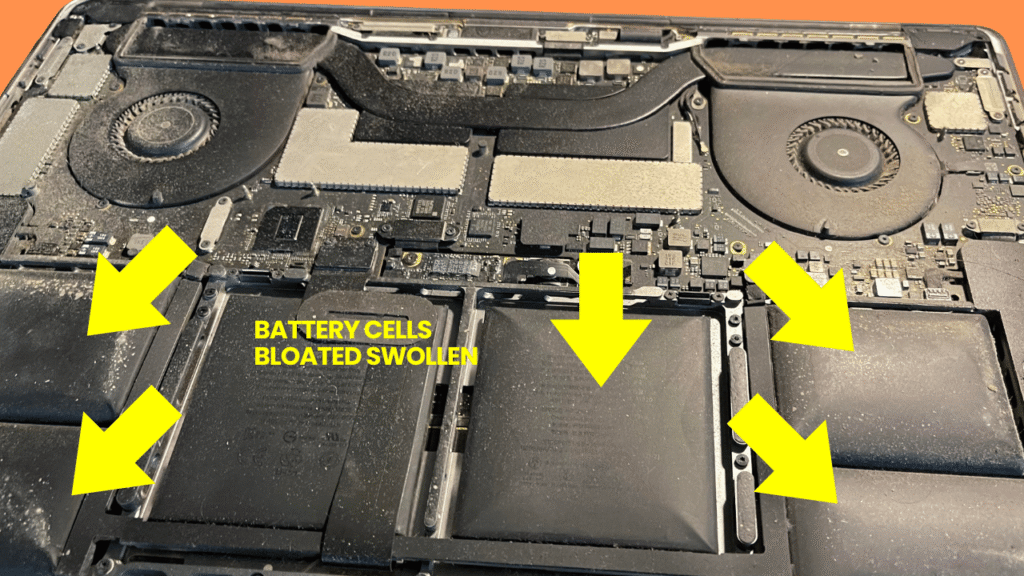
When a MacBook sits on a desk for years, its internal cooling fans pull in massive amounts of dust, pet hair, and particles. This dust clogs the aluminium heat sink, trapping hot air inside the casing. Heat is the single biggest enemy of lithium ion battery health and logic board longevity.
When you change your battery with us, we add real maintenance value back to your machine:
Free Internal Dust Cleaning: We open the chassis, clean out the fan housing, and clean away all internal dust build up to restore clean airflow.
Thermal Paste Replacement Option: If you are a creator, video editor, programmer, or AI developer pushing high workloads, old dried up thermal paste makes your processor overheat. We can reapply the thermal compound on your CPU and GPU chips to keep temperatures optimum, prevent thermal throttling, and extend the life of your new battery and logic board.
Frequently Asked Questions
What does battery capacity (mAh / Wh) mean, and how do I check mine?
Milliampere-hours (mAh) and Watt-hours (Wh) measure the total volume of electrical energy a battery cell can store when fully charged to 100%. You can check your Mac current full charge capacity by holding the Option key, clicking the Apple icon in the top left corner, select System Information, and click on the Power tab.
Will a swollen MacBook battery damage my trackpad or logic board if I leave it in?
Yes. As degraded lithium-ion cells will swell, they release immense upward pressure directly against the side of your trackpad, keyboard, and aluminium top case. Leaving a swollen battery inside your Mac can crack the trackpad, caused damage to internal casing screw threads, and permanently damage the aluminium body.
Why does Orange Fix offer a 1 year warranty when official only offer 3 months?
Official service channels use a standard warranty windows for exchange parts. Because we source our Original Equivalent battery inventory directly from verified main manufacturers and run voltage testing on them, we have total confidence in our battery cell stability thus allowing us to provide longer warranty.

Topics That Might Interest You
Got water inside your Apple Watch or confused about IP ratings? Read our direct breakdown on watch water damage waterproof water resistance to learn how liquid seals degrade over time.
Had your MacBook messed up or rejected by another repair shop previously? Find out how our technician team evaluates second hand diagnostic cases in macbook repair by others before can we help.
Curious about the story, history, and face behind our workshop branding? Get the real background on our co-founder by exploring who is 大马苹果佬?

About The Author
This article is written with input from Kevin, who has 18 years of hands on experience in MacBook repair, logic board inspection and Apple device care. Kevin and the OrangeFix team are also daily Apple product users, so every guide is written from real repair experience and practical user understanding.
Kevin has shared his repair knowledge through a CityPlus FM radio interview and has also been featured twice in The Star for gadget care, water damage advice and digital decluttering tips.
OrangeFix is an independent repair centre in SS15, Subang Jaya.